


Excel files that contain macro if one of the most common ways to spread malicious files. I am sure every information security-related person saw these files at least once in his life, but do you think you know all about them (or at least most of what you need to know)? I don’t think so, and let me explain why.
We will start with what are excel macros.
What are Excel Macros?
Macros are code that automates work in a program—they let you add your tiny features and enhancements to help you accomplish exactly what you need to do, quickly with just a click of a button. In a spreadsheet tool like Excel, macros can be especially powerful. Hidden behind the standard user interface, they are more potent than standard functions you enter into a cell.
These macros make Excel work for you. They replace actions that you do manually—everything from formatting cells, copying values, and calculating totals. So with a few clicks, you can quickly replace repetitive tasks.
What is Macro Malware?
Macro sounds very good and harmful, but as we already know, that is not true, thanks to macro malware.
Macro malware (sometimes known as macro viruses) takes advantage of the VBA (Visual Basic for Applications) programming in Microsoft Office macros to spread viruses, worms, and other forms of malware. Macro viruses were relatively common during the 1990s but experienced a lull after the everyday user learned how to combat these threats. With the emergence of more sophisticated social engineering tactics and the steady popularity of macro programs among businesses, the return of macro malware was inevitable.
Most of the macro malwares are written in VBA, but there are more sophisticated macros that we will discuss today: P-code macros and Excel Macro 4.
VBA macros
VBA(Visual Basic for Application) works within most Office programs. These macros are an especially attractive target because so many people use office, and it is pretty easy to add a VBA macro to the Office file. (You can find how to create VBA macro instructions here). By default, when opening a macro-enabled document, users receive a warning in the form of a message bar at the top of the application letting them know that ‘Macros have been disabled.’ The user has the option of enabling the macros for that document. Microsoft must let users do this because some people use macros for legitimate purposes.

VBA macro can do everything, starting from doing legitimate automated work as well as going to Command – and – Control server and download the real malicious file. You can find an example for every VBA macro code you want on google.
- While it is widely used its very easy to find a VBA macro in your file:
- Show developer tab:
- 1. Go to file -> Options -> Customize Ribbon
- 2. Under Customize the Ribbon and under Main Tabs, select the Developer check box.
- Show developer tab:
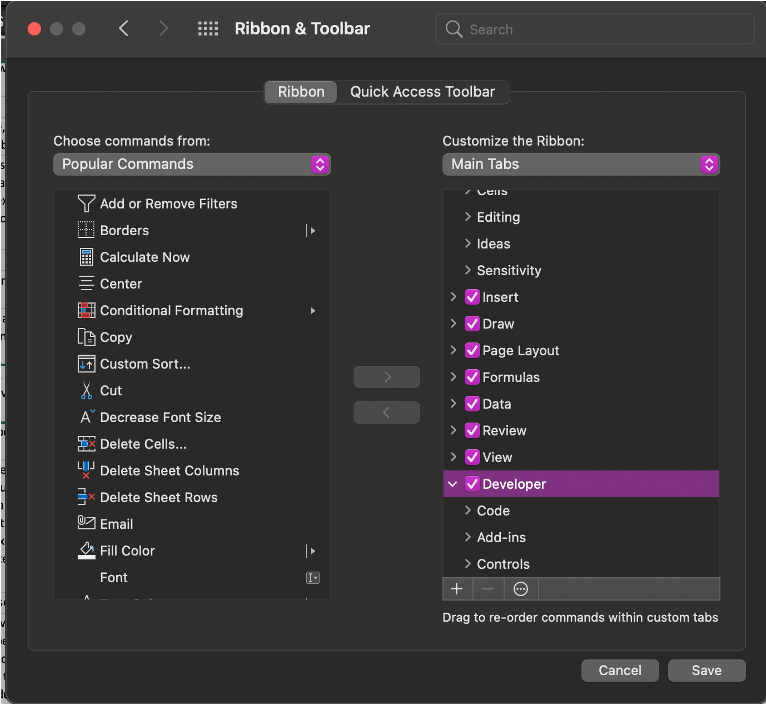
3. Go to newly added Developer tab and click on Macros

P-code
As each VBA line is entered into the VBA editor, it is immediately compiled into a p-code (a pseudo code for a stack machine) and stored in a different place in the module stream. The p-code is precisely what is executed most of the time. Even when you open the source of a macro module in the VBA editor, what is displayed is not the decompressed source code but the p-code decompiled into a source.
There is powerful malicious document (maldoc) generation techniques that are effective at bypassing anti-virus detection. We refer to a technique that we refer to as VBA stomping, initially brought to our attention by Dr. Vesselin Bontchev (see here). VBA stomping refers to destroying the VBA source code in a Microsoft Office document, leaving only a compiled version of the macro code known as p-code in the document file. Maldoc detection based only on the VBA source code fails in this scenario. In this blog post, we will demonstrate detailed examples of VBA stomping and introduce some additional techniques.
Sounds scary, isn’t it? But do not worry, there is a tool especially written for these kinds of macros, and it is called pcodedmp.py, and you can download it from here.
Excel macro 4
Excel 4.0, or XLM macros, is a 30-year-old feature of Microsoft Excel gaining popularity among malware authors and attackers, especially over the last year (see Chart 1). This macro code type is actively being abused and weaponized by attackers to deliver additional, more persistent malware. What makes this technique effective is that much like the more popular and up-to-date VBA macros, Excel 4.0 macros are a component of legitimate Excel functionality, thus, will likely never be disabled, as they are used regularly for benign business purposes. For example, the commonly used SUM function is used in many spreadsheets to obtain the sum of a range of cells. Macros of this type are commonly referred to as “formulas.”
I did not imagine that this type of macros can be used to attack organizations till I got it myself. One day I got an email from an unknown sender with an excel file attached to it. I am an experienced information security analyst, so as usual, I wanted to check that file before I am opening it in the organizational workstation. I sent the email to my private computer and opened it in my virtual lab. It looked like that:
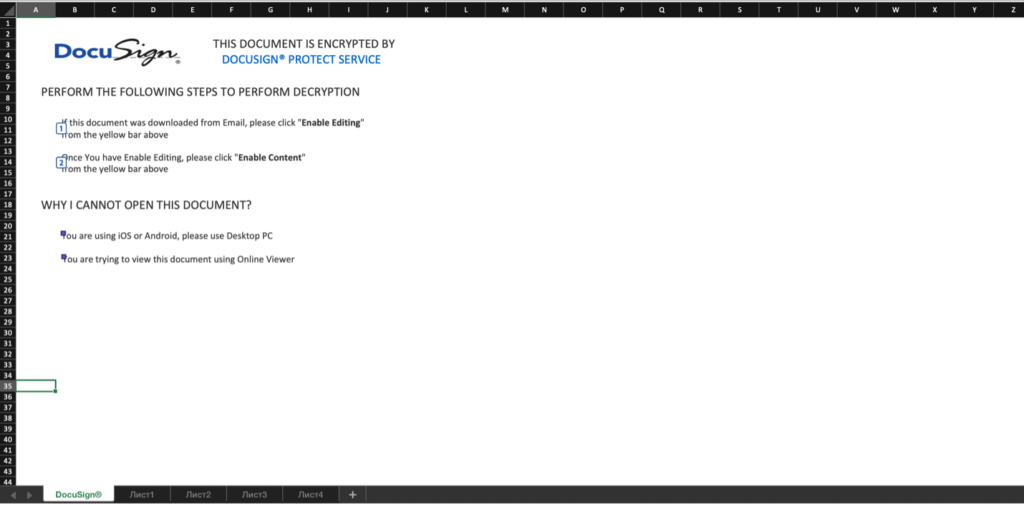
As you see, Excel tells me that macro was disabled. I checked the macro tab. It wasn’t were. So I run the pcodedmp.py and still found nothing. So I decided to unzip the file. Running through unzipped file streams, a found the interesting string “Excel Macro 4.0”. I googled it and found out what it is. I assumed that the first command is behind the picture that I cant move cause the sheet is password protected. I found some VBA script for brute-forcing the excel sheet password and run it. I was able to move the picture and change font color (I thought that as an attacker, I would not like it if someone just sees my macro so that I would change excel font color to white). So after changing the color, I was able to see the command of downloading and executing another file on my station:
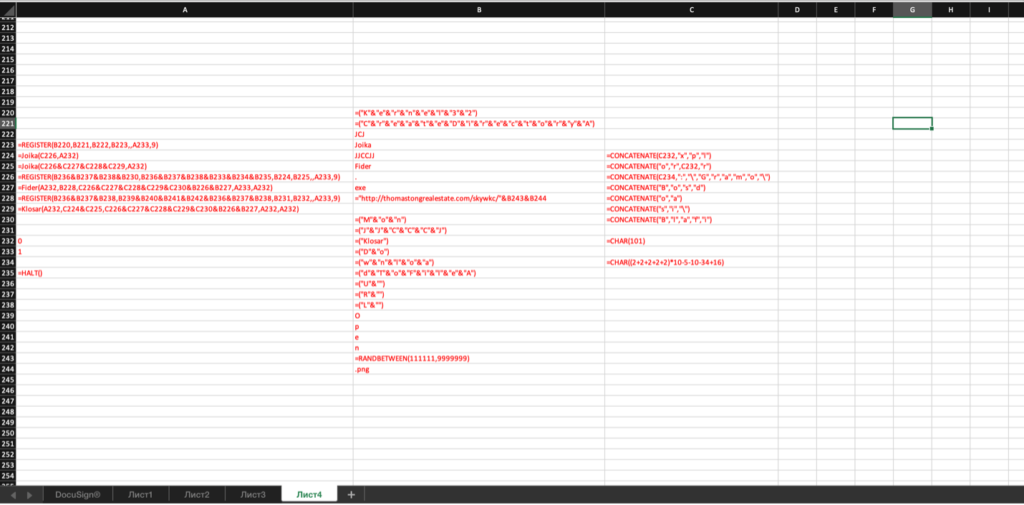
I actually had to find all their Excel Macro 4 command manually cause I did not find any tool that does that. So I decided to write my own tool for that, and you can download it here. I hope it will make your life easier.
Summary
Excel macros are powerful and dangerous, especially if you don’t know how to find them. The purpose of this article was to expand your understanding of Excel macro so you will always be prepared to deal with them.
Resources
https://zapier.com/blog/excel-macros/
https://digitalguardian.com/blog/what-macro-malware
https://home.sophos.com/en-us/security-news/2019/macro-viruses.aspx
https://www.trustedsec.com/blog/malicious-macros-for-script-kiddies/
https://github.com/bontchev/pcodedmp
